
Super Touchpoints Planner
The JICMAIL Super Touchpoints Planner is an AI assisted planning framework designed to bring the power of Super Touchpoints planning to life.
The JICMAIL Super Touchpoints Planner is an AI assisted planning framework designed to bring the power of Super Touchpoints planning to life. JICMAIL accredited organisations can now access the Super Touchpoints Planner through JICMAIL Discovery.
The interactive dashboard enables planners to assign STEP scores (Super Touchpoints Evaluation Points) to eight different channels, fifty different default Touchpoints and unlimited customizable Touchpoints using the evaluation criteria determined by a roundtable of industry experts and outlined in the “Mail: The Super Touchpoint” report.
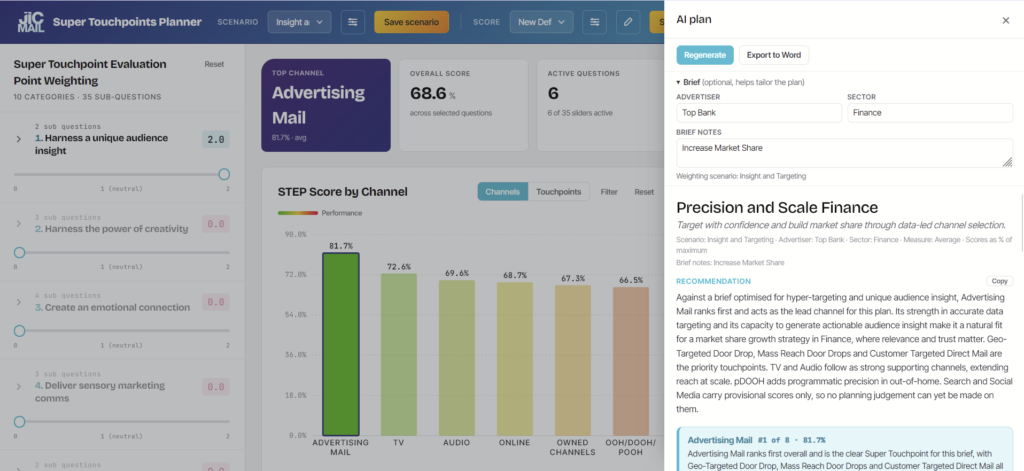
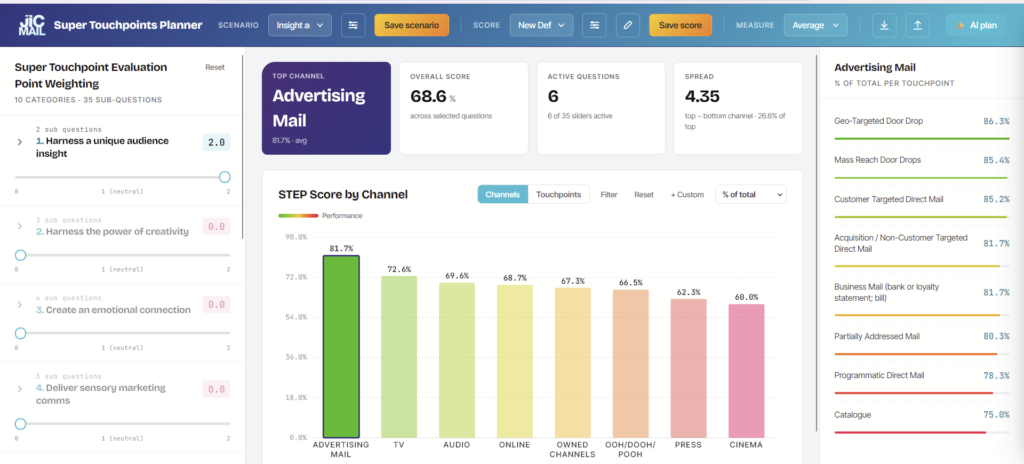
Scores can be assigned at the macro level using the Top 10 Super Touchpoints checklist, or against a more detailed evaluation criteria across thirty-five different factors.
The default scores assigned to each channel are designed as a fast-start and have been assigned by AI scouring industry sources online including trade body websites, JIC websites and media research websites. JICMAIL strongly recommends checking these scores against your own assumptions and over-writing them with your understanding of how these channels and touchpoints work for your campaigns with your target audiences and customers.
The Super Touchpoints Checklist
1. Harness a unique customer insight
2. Harness the power of creativity
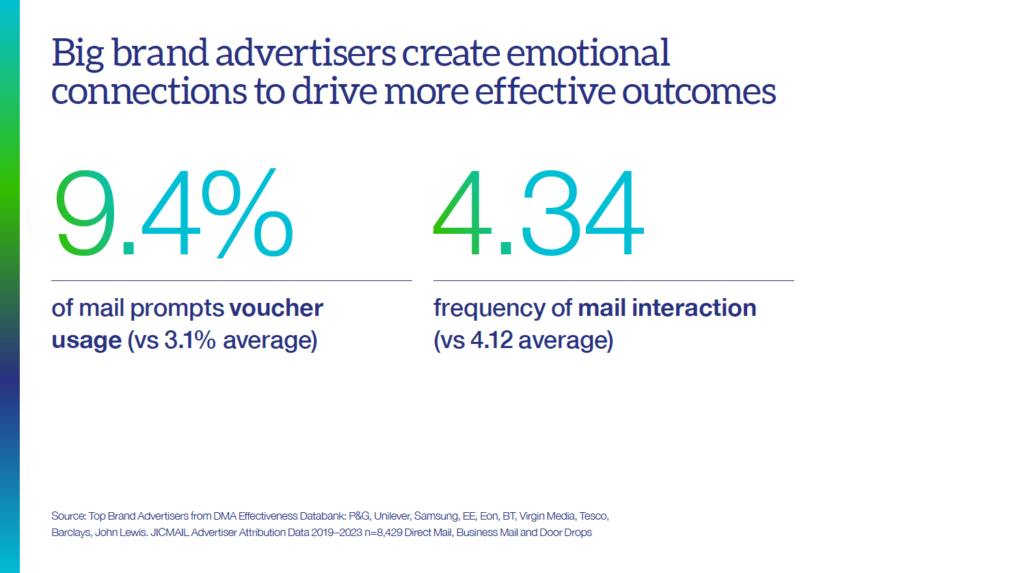
3. Creative an emotional connection
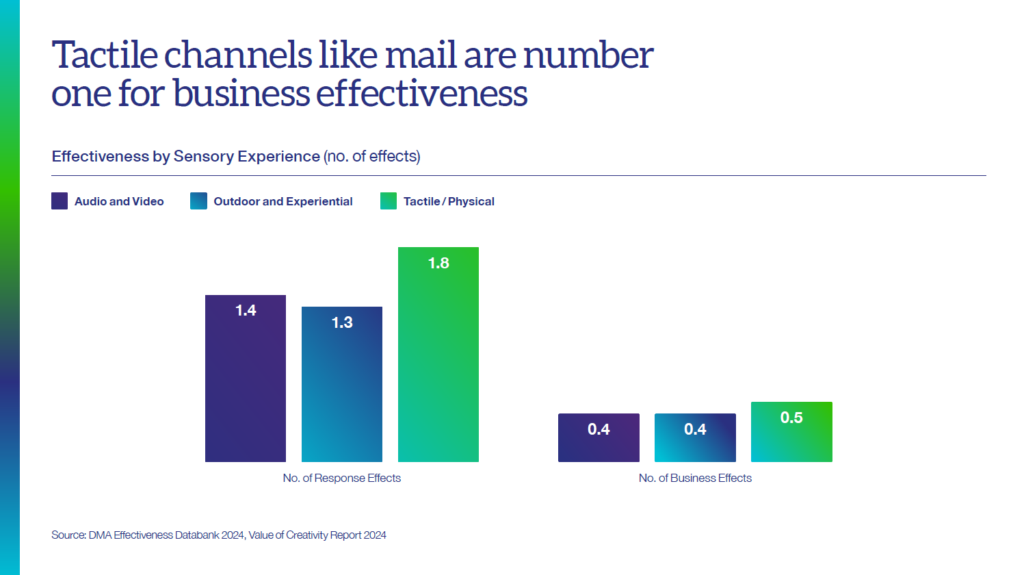
4. Deliver sensory marketing comms
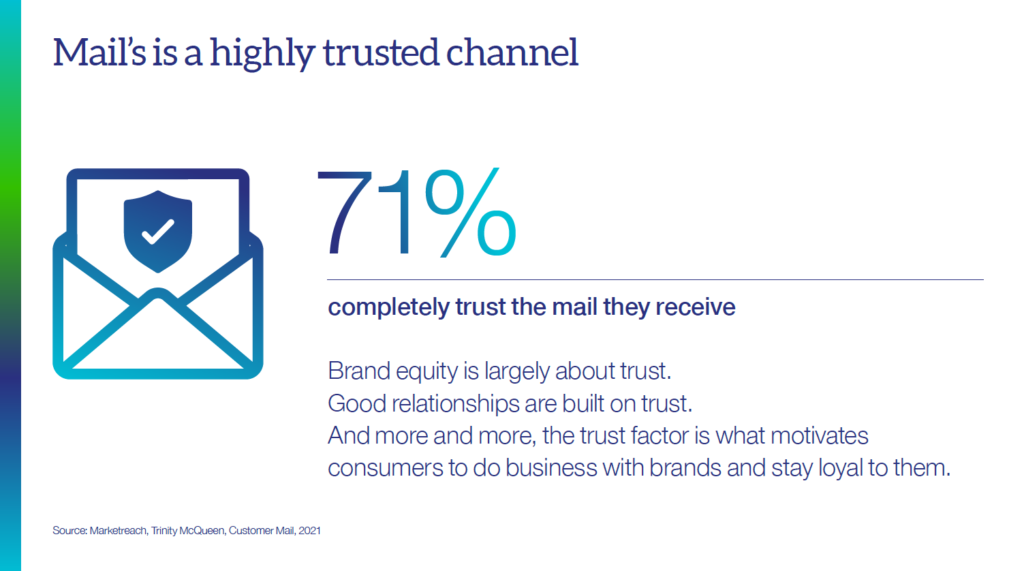
5. Leverage trust
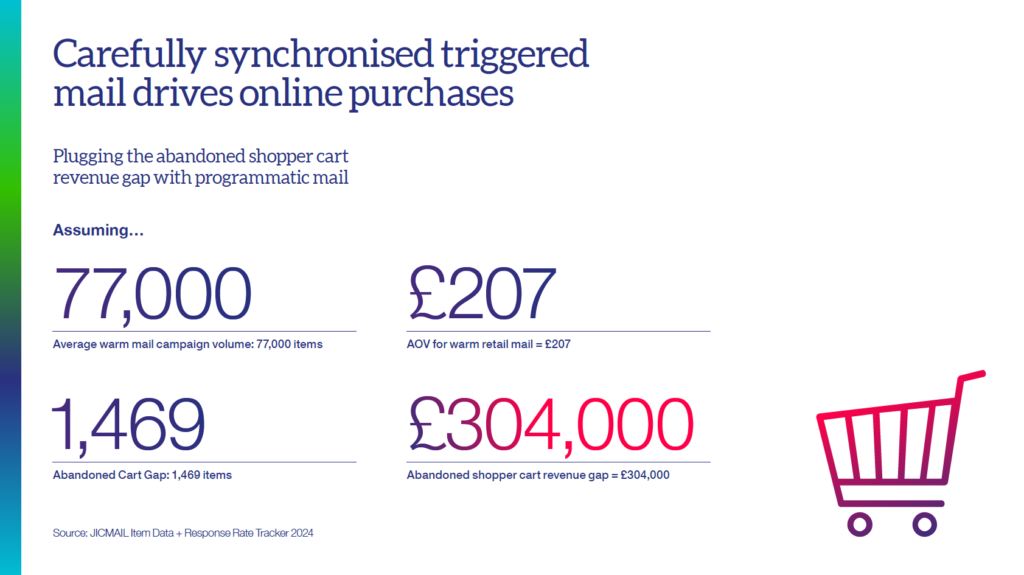
6. Delivery carefully synchronised comms
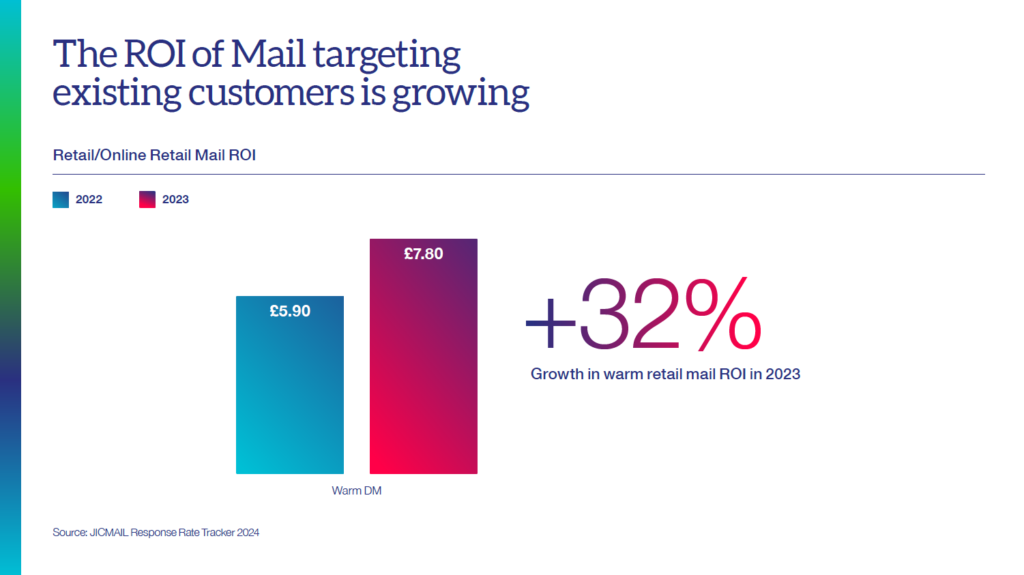
7. Hyper-target or build scale
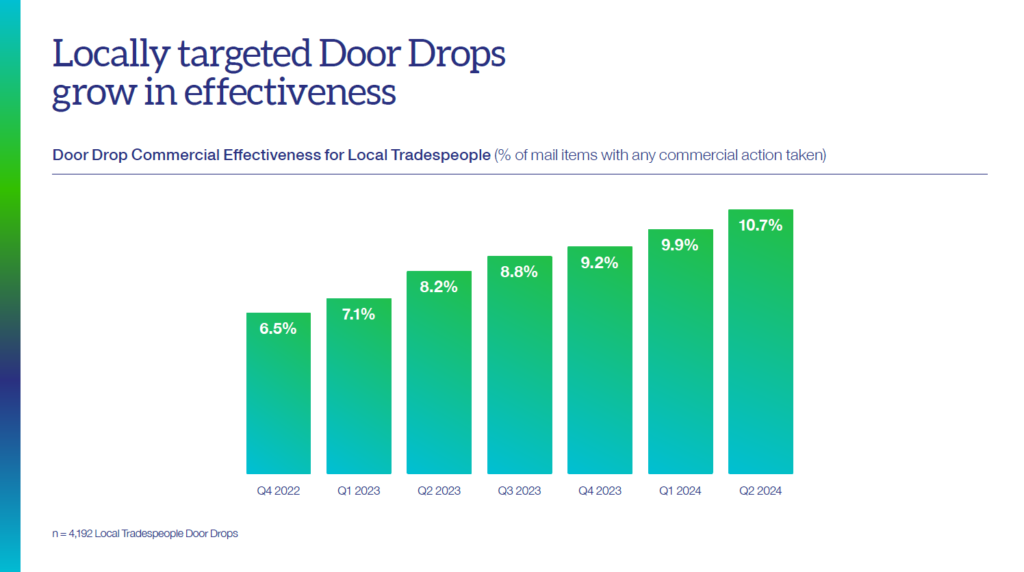
8. Explore rich targeting opportunities
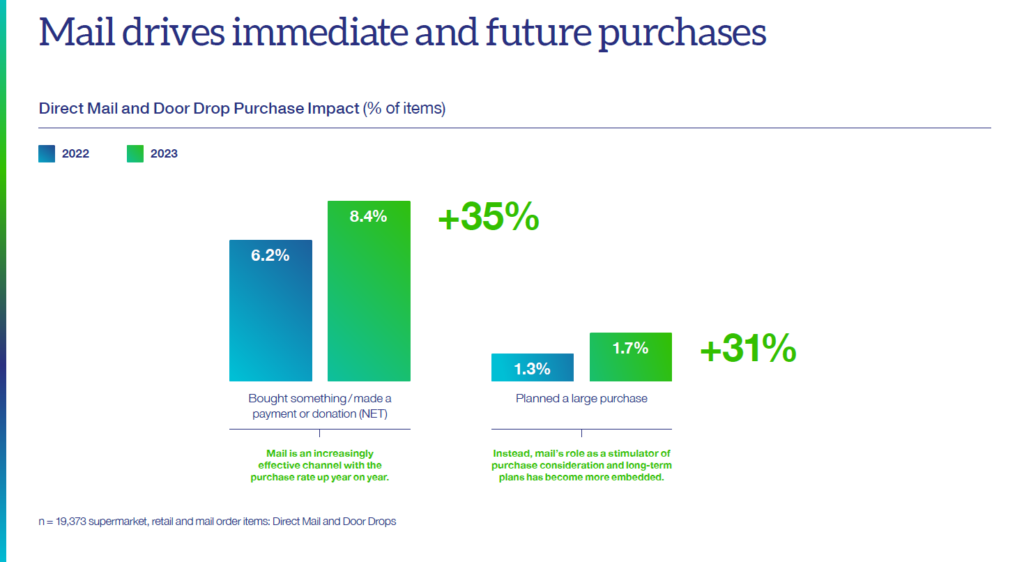
9. Build full funnel effects
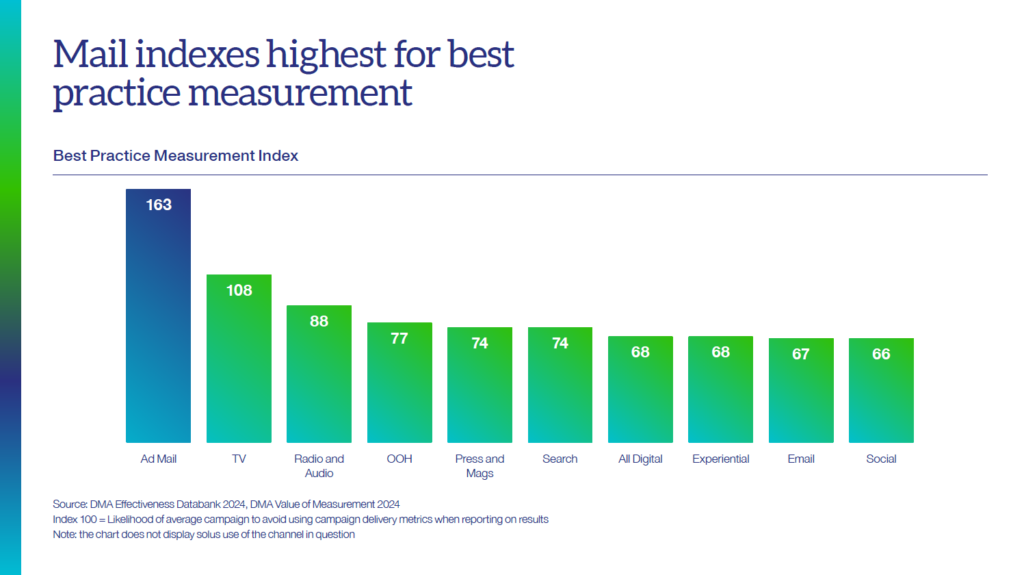
10. Deploy best practice measurement
The Super Touchpoints Planner is designed as an overlay rather than a replacement to existing planning processes. It is intended to codify planning best-practice and provide a useful sense check to seasoned marketers and new-starters alike.
The resulting insight delivered through an AI summary document will enable planners to evaluate which channels are offering disproportionate effectiveness; offer a re-appraisal of channels that might be over or under-invested in; and crucially provide inspiration for test-and-learn scenarios using combinations of different Touchpoints.
The Super Touchpoints Planner is a browser-based tool. All scores and saved settings are stored locally rather than on the cloud, and a simple scoring-matrix download and upload function enables insight sharing with colleagues.
Watch the tutorial video above to get up to speed on how to use the Super Touchpoints Planner, but as a quick-start we recommend taking the following steps below.
1. Touchpoint Selection:
Filter the channels and touchpoints that you want to assess for your specific campaign. Select from fifty different default touchpoints and use the “+custom” feature to add any that are missing.
2. Touchpoint Weighting Criteria:
Decide how much weight you want to assign to each Super Touchpoint evaluation criteria: either at the Top Ten Checklist level, or the detailed thirty-five point factor level. By default equal weighting is given to each criteria, with presets available for brand, response, retention and acquisition campaigns. Save your customised weighting profile using the “save scenario” function.
3. Touchpoint Scoring:
Open the “edit score values” grid to apply scores and overwrite the default scoring to each selected touchpoint, either at the Top Ten Checklist level, or the detailed thirty-five point factor level. A value of between one and ten should be entered against each Touchpoint based on your understanding of how it works for your specific campaigns and target audiences. If unsure, the default value can be used. Scores can be saved using the “save score” feature.
4. STEP Score Evaluation Chart:
The resulting scores will update in the headline chart with an aggregate score calculated based on individual criteria scores and the selected weighting profile. Results can be viewed at the channel level or touchpoint level – either using an average score (out of ten) or a percentage score. Touchpoints are colour-coded from green to red according to performance.
5. Super Touchpoint AI Plan:
Use the “AI plan” function to enter a brand name, sector and campaign objectives to generate a written summary of recommendations, along with weighting and scoring summaries by the channels and touchpoints selected.
6. Scenario Sharing:
Saved scoring and weighting profiles can be downloaded in to excel, saved in a central location, shared with colleagues and partners and re-uploaded into the planning tool to ensure a consistent cross-team view on the results of the STEP scoring exercise. For those who prefer to work in excel rather than the interactive dashboard, all scores can be assigned in an excel workbook and re-uploaded into the system.
Key Questions to Ask After Viewing Results:
- Are the resulting channel and touchpoint rankings a fair reflection of how we think they drive effectiveness in your organisation?
- Are there any channels or touchpoints which you feel you are under-investing in given their Super Touchpoints strengths?
- Are there any channels or touchpoints which you feel you are over-investing in given their Super Touchpoints weaknesses?
- Have the results inspired you to think of previously un-considered touchpoint and channel pairings that either work synergistically (i.e. have the same Super Touchpoint strengths or complimentary to each other (i.e. draw upon different Super Touchpoint strengths).
- What tests will you perform with your next campaign that have been inspired by previously unconsidered Super Touchpoints in the multi-channel marketing mix?
- How can you use the principles outlined in the Super Touchpoint Evaluation framework to upskill your teams in the considerations crucial for delivering best practice planning?